Blog · Email
AI email agent: email automation that reads attachments
· 5 min read
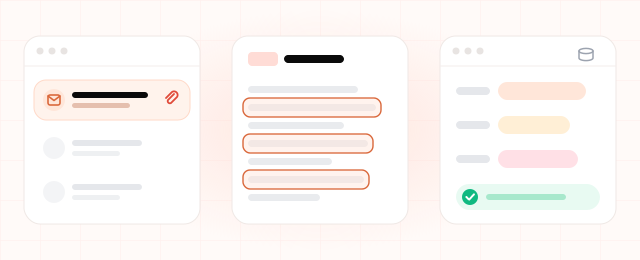
Monday, 9 a.m., at a building-supplies distributor. Sales support opens the shared inbox and finds the weekend waiting. Three resellers have sent their orders as spreadsheets. A customer has attached a PDF purchase order marked "URGENT". Five people want to know when their order ships. The morning is gone before it starts: open every message, key each attachment into the ERP line by line, look up every order on another screen. An AI email agent is email automation built for exactly this kind of morning.
What does an AI email agent actually do?
It reads each message in your mailbox the way a colleague would, attachments included. A rule-based filter only sees the sender or a keyword in the subject. An agent works out what the sender wants and moves the work forward in your own systems:
- Sorting. It tags each email by topic (new order, status question, invoice, complaint) and routes it to the right person.
- Reading attachments. Item codes, quantities, dates and amounts come out of PDF order forms, spreadsheets and scans.
- Data entry. That data goes into your ERP or CRM, with doubtful lines flagged.
- Drafting replies. It checks order or stock status in the ERP, writes the answer, then either sends it or holds it for one-click approval.
One email, start to finish
Take this email from a reseller. The PO number and line counts are made up.
Subject: November order + PO 4821
Body: "Hi, our November order is in the attached spreadsheet. Also, where are we with PO 4821? Our customer wants a delivery date."
- Classifies it. There are two requests here, a new order and a status question. The sender's address matches the reseller's account.
- Reads the spreadsheet. 18 lines. Seventeen item codes match your ERP; one is a discontinued code.
- Enters the order. A draft sales order with the 17 matched lines and a note about the odd one out.
- Checks the status. PO 4821 is being picked and ships Thursday.
- Writes the reply. "We've entered 17 lines of your November order. We couldn't find the item code on line 12. Could you send the current one? PO 4821 ships Thursday, and we'll send tracking the same day."
- Waits for approval. Sales support checks both and approves them with one click.
Your team stops typing lines and starts checking them. Note the unmatched code: a well-built agent asks about gaps like that instead of guessing.
Send automatically, or wait for a person?
Low-risk emails answered straight from an ERP field, such as order status or an invoice copy, can go out on their own once you trust the drafts. Anything that creates a record or commits you to a price or a date should pass through a person. You decide which topic runs in which mode.
Is it a fit for your company?
The agent pays off where work arrives by email but gets done in the ERP:
- Orders and quote requests arrive as attachments, and someone keys them in by hand.
- The same status questions get answered every day by looking things up in the ERP.
- Several people watch a shared address like orders@, and nobody is sure who replied to what.
It's probably not worth it if you get a handful of emails a day, if most of your email is one-off negotiation, or if the answers live in people's heads rather than in a system the agent can query. And if your customers mostly message you on WhatsApp, a customer service agent may be the better place to start.
Where people stay in charge
Some emails the agent should only route, with a short summary and the order data attached, to the person who decides:
- price, discount and payment-term negotiations
- complaints, especially from a customer who is already unhappy
- replies that touch contracts, penalties or anything with legal weight
- exceptions to your written policy, like adding lines to a closed order
How much time would email automation save you?
The saving has two parts: replies drafted and attachments entered.
Hours saved per month = [(replies drafted × minutes saved per reply) + (attachments processed × minutes of manual entry per attachment)] ÷ 60
Example figures: the agent drafts 1,200 replies a month, and after review time your team saves 3 minutes on each. It also processes 250 order attachments a month, at about 8 minutes of manual entry each.
(1,200 × 3 + 250 × 8) ÷ 60 = (3,600 + 2,000) ÷ 60 ≈ 93 hours a month
Use one month of your own email, and ask your data-entry staff how long a typical attachment takes. The formula leaves out typing errors, which cost money too.
Before you set it up: a checklist
- Mailboxes. Which addresses the agent reads, and which folders it may touch.
- Topics and owners. Five to ten topics for sorting, each with a named owner.
- Real attachments. Actual spreadsheets and PDFs from your customers, since everyone uses their own template.
- ERP permissions. What it can read and what it can write. Start with writes limited to draft records.
- Data protection. Emails carry personal data, so GDPR applies, and KVKK too if you process data in Turkey. Know where it is processed, how long it's kept and who sees it. Your privacy notice and processing agreements should cover the agent.
- Audit trail. A record of what the agent drafted, who approved it and what changed in the ERP.
Starting small
- Pick one mailbox, such as orders@. For the first week the agent only tags incoming email, and your team checks the tags.
- Add one job. Attachment entry or status questions, whichever eats more time today. The agent drafts, your team approves.
- Turn on auto-send last. When most drafts are approved without edits, try automatic sending for one low-risk topic.
If you're in logistics and rate requests land in the same inbox, the freight quote agent is a natural next step. The other agents we build are under our solutions.
Let's look at your inbox together
We build email agents connected to your ERP and CRM. In a short discovery call we'll work out which of your emails an agent could take over.